
Build Your First AI Project This Weekend
Stop consuming tutorials. Start creating. Get the free step-by-step guide.
You’re spending money on ads. But do you actually know which clicks turn into customers?
Most people starting an AI-powered business skip tracking because it feels technical and complicated. They rely on whatever Facebook or Google tells them about conversions. Then they wonder why their campaigns aren’t profitable.
Here’s the problem: platform-reported conversions miss 20-40% of what actually happens. You’re making decisions on incomplete data.
A click tracker fixes this. It collects every data point about every visitor, then tells you exactly which traffic sources, placements, and audiences make money. Without one, you’re guessing.
I’ve run campaigns for over a decade. Tracking is the single skill that separates profitable marketers from people burning money. This guide shows you exactly how it works so you can set it up right the first time.
Quick Navigation
| Section | What You’ll Learn |
|---|---|
| AI + Tracking Data | Analyze campaigns in minutes, not hours |
| First-Party Data | Track accurately in a cookieless world |
| Click Tracking Terms | Key concepts you need to know |
| What Is A Click Tracker | How trackers actually work |
| Using Collected Data | Turn data into profitable decisions |
AI + Tracking Data Analysis
Here’s where AI changes the game for anyone building a business.
Tracking collects the data. AI analyzes it faster than you ever could manually.
The old way: Export a CSV, stare at spreadsheets for hours, maybe spot a pattern, probably miss something important.
The new way: Paste your data into Claude, ask specific questions, get actionable insights in minutes.
I use this workflow after every campaign hits 100+ clicks. Here are the exact prompts:
Find winners and losers:
"Here's my campaign data [paste CSV]. Identify:
- Top 5 converting placements by ROI
- Placements to blacklist (negative ROI, 100+ clicks)
- Time-of-day patterns in conversions
- Device/OS segments worth scaling"
Test landing pages with confidence:
"Compare these two landing page variants:
[paste A data]
[paste B data]
Which is statistically better? Is the sample size sufficient to call a winner?"
Catch problems before they drain your budget:
"Here's my last 30 days of data. Identify:
- Any anomalies or sudden changes
- Trends I should act on immediately
- Segments where performance changed significantly"
AI catches patterns across thousands of data points that you’d miss manually. It doesn’t replace understanding the fundamentals below, but it turns a 2-hour analysis session into a 10-minute conversation.
Next step: Full AI analysis workflow for media buying
First-Party Data: Why It Matters Now
If you’re starting a business in 2026, understand this: the tracking landscape has changed.
What broke:
- Third-party cookies are dead or dying
- Browser restrictions block most tracking pixels
- Facebook and Google can’t see 20-40% of your conversions
What this means for you:
- Platform-reported data is incomplete
- Decisions based solely on platform data lose money
- You need your own tracking infrastructure
What to build:
- Server-side tracking (required for any serious volume)
- First-party data collection on domains you control
- Self-hosted tracking so you own the data
The fundamentals in this guide still apply. You just need to implement them with privacy-first architecture from day one. Don’t build on a foundation that’s crumbling.
 Disclosure: Some links below are affiliate links. I earn a commission if you purchase, at no extra cost to you.
Common Click Tracking Terms
Before setting anything up, learn these terms. Every tracking platform uses different names for the same concepts. This glossary prevents confusion when you’re connecting your tracker to traffic sources and networks.
- KPI (Key Performance Indicator): A measurable value showing performance. Examples: cost per click, conversion rate, ROI by placement.
- User-Agent: Text your browser sends identifying your device, OS, and browser. Trackers use this to segment mobile vs desktop, iOS vs Android, etc.
- Query String: Everything after the “?” in a URL. This is how data passes between systems. Example:
?source=facebook&campaign=test1 - URL Parameter: A key=value pair in the query string. In
?source=facebook, “source” is the key and “facebook” is the value. Separate multiple parameters with “&”. - TrackingID (ClickID): A unique identifier for each click. This is how your tracker knows which specific visitor converted. Every click gets a unique ID.
- SubID: Same concept as TrackingID, different name. Networks call these SubID, S1, S2, ClickID, TrackingID - all just URL parameters passing click-level data. Don’t let the naming confuse you.
- Tracking Link: The URL your tracker generates. When someone clicks it, your tracker captures their data before redirecting them.
- Offer Link: The URL from your affiliate network or advertiser. Don’t confuse this with your tracking link - they serve different purposes.
- Postback: A URL that fires when a conversion happens, sending the TrackingID back to your tracker. This closes the loop so you know which click made money.
What Is A Click Tracker?
A click tracker is the foundation of every profitable paid traffic business. It does two things:
- Collects data about every visitor
- Shows you what’s working so you can scale winners and kill losers
Without a tracker, you’re flying blind. With one, you know exactly which ad, placement, device, and geo combination makes money.
How It Works (Simple Version)
A tracker is a database. Think of it as a spreadsheet that automatically fills in a new row every time someone clicks your ad.
Here’s the flow:
- Visitor clicks your ad
- Ad sends them to your tracking link
- Tracker captures their data (device, location, browser, etc.)
- Tracker assigns a unique ID to this click
- Tracker redirects them to your landing page or offer
- If they convert, the network fires your postback
- Postback tells your tracker which click made money
Now you can see which traffic sources, placements, and audience segments actually convert.
Data Your Tracker Collects
Standard Data (Automatic)
Your tracker captures this from every visitor without any setup:
- Device: Mobile, Tablet, Desktop
- Device details: Manufacturer, Model, Operating System
- Browser: Chrome, Safari, Firefox, etc.
- ISP & IP address: Who provides their internet
- Location: Country, State, City, Zip code
- Referrer: Where they came from
This data is captured during the redirect. When someone clicks your tracking link, the tracker grabs their user-agent and IP, extracts all the KPIs above, stores them, then sends the visitor to your destination.
Dynamic Data (From Traffic Sources)
Beyond automatic data, you can pass custom information through the URL. This is where the real optimization power comes from.
Most traffic sources have tracking macros - placeholders that automatically get replaced with real data when someone clicks.
Setting Up Tracking Macros
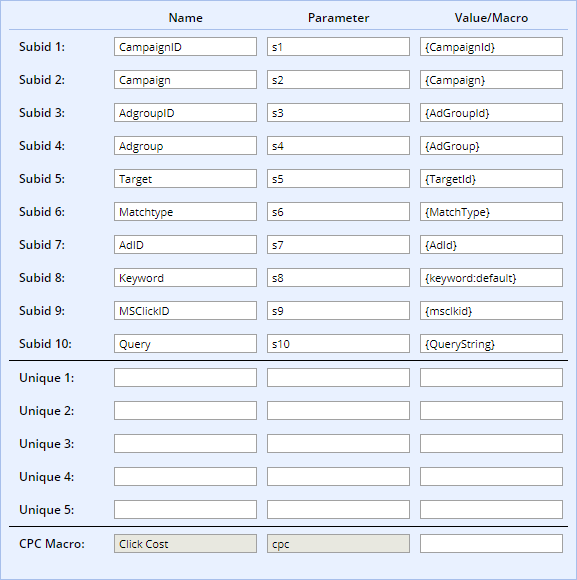
Here’s how I set up Microsoft Advertising macros in my tracker:
- Name: What you’ll see in reports (Campaign ID, Campaign Name, etc.)
- Parameter: The URL parameter (s1, s2, etc.)
- Value/Macro: The placeholder your traffic source provides
The link you paste into Microsoft Advertising:
https://marketunlock.com?s1={CampaignId}&s2={Campaign}
What Microsoft converts it to when someone clicks:
https://marketunlock.com?s1=335673075&s2=Campaign-Name
Your tracker stores this alongside the automatic data. Now you know exactly which campaign generated each click.
When Traffic Sources Don’t Have Macros
Facebook, Snapchat, and Quora don’t offer dynamic macros. You have to pass data manually.
This means more campaigns with unique URLs, but it’s worth it to get granular data.
What you can track manually:
- Ad creative ID
- Placement (Domain, Site ID)
- Demographics (Age, Gender)
- Interests or audiences
Example: You’re targeting 25-50 year old women on Facebook but want to know which age range converts best.
Create separate campaigns with unique tracking URLs:
25-30 year olds:
https://marketunlock.com?age=25-30&gender=Female&placement=NewsFeed
31-35 year olds:
https://marketunlock.com?age=31-35&gender=Female&placement=NewsFeed
Yes, it’s more work. But this is how you find the specific audience segments that are actually profitable. Most advertisers are too lazy to do this - that’s your edge.
Conversion Tracking: Closing The Loop
This is where everything comes together. You’ve collected data about each click. Now you need to know which clicks actually made money.
The key concept: Every click gets a unique TrackingID. When a conversion happens, the network sends that ID back to your tracker. Now you know exactly which click converted - and all the data attached to it.
Step-by-Step Setup
1. Find your network’s SubID parameter
Every network uses different names (s1, subid, clickid, etc.). Check their documentation or ask your affiliate manager.
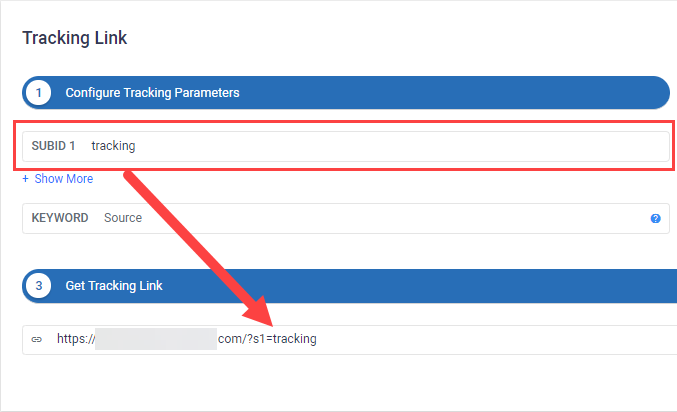
YTZ allows five SubID slots. I use s1 for my TrackingID and pass other data through s2-s5.
2. Add the offer link to your tracker with the TrackingID macro
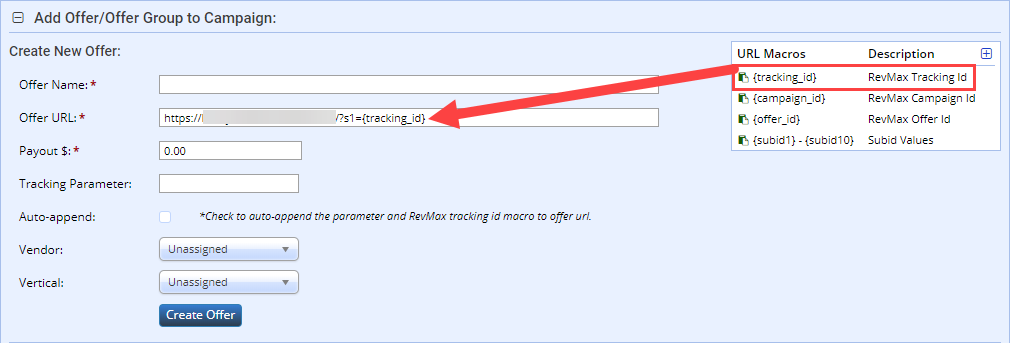
Your tracker has a macro (like {tracking_id}) that gets replaced with the actual ID for each click.
The link template:
https://ytztrackinglink.com/?s1={tracking_id}
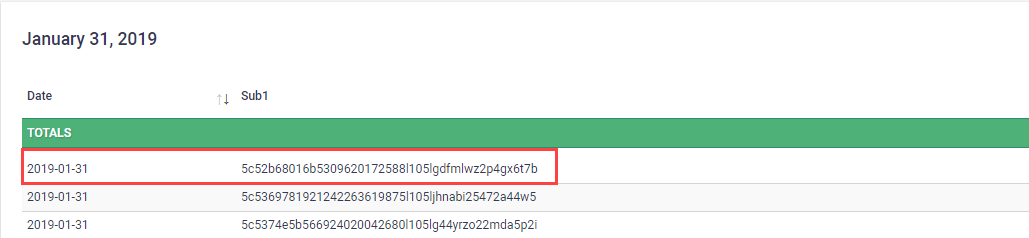
What the visitor actually sees:
http://ytztrackinglink.com/?s1=5c52b68016b5309620172588l105lgdfmlwz2p4gx6t7b
3. Verify the ID is passing correctly
Check your network’s reports. You should see your TrackingID in the SubID column.
4. Set up the postback
A postback is a URL that fires when a conversion happens, sending the TrackingID back to your tracker.
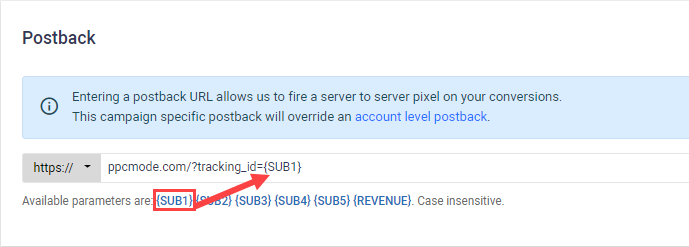
Your tracker gives you a postback URL. Paste it into your network’s postback settings. Make sure the macro matches the SubID slot you used. I used s1, so I use {SUB1}.
5. Confirm it’s working
When conversions happen, they should appear in your tracker automatically.

Now you know exactly which click made money - and all the data attached to it (device, location, placement, time, etc.).
Why This Matters For Your Business
Your tracking data is your competitive advantage. The network only sees a random ID. You see everything: which traffic source, which ad, which demographic, which time of day.
A word of caution: Keep your data private. Most networks are trustworthy, but affiliate managers sometimes share winning data with other partners as an incentive to test offers. I’ve been on the receiving end of this - it’s how I got started with some verticals. Don’t let it happen to you.
Using Your Collected Data
Data means nothing if you don’t act on it. Here’s how to turn tracking data into profit.
The Optimization Process
- Run traffic until you have statistically significant data (at least 100 clicks per segment)
- Break down by KPI - device, geo, placement, time of day
- Identify winners - segments with positive ROI
- Kill losers - segments with negative ROI and enough data to be confident
- Scale winners - create new campaigns targeting only profitable segments
- Repeat - keep drilling down until you’ve found every profit pocket
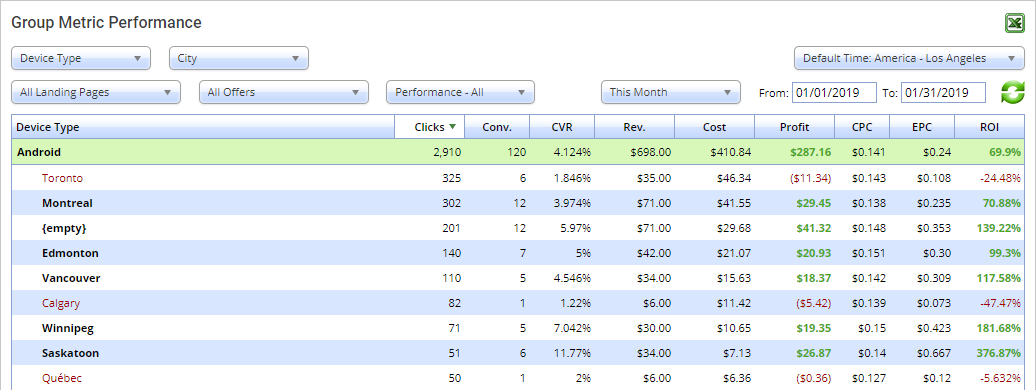
In this example, I broke down by Device Type and City. Android devices from Toronto aren’t converting as well as other cities.
Option 1: Exclude Toronto in your traffic source settings.
Option 2: Use redirect rules (below) if your traffic source doesn’t allow exclusions.
Redirect Rules: Monetize Bad Traffic
Most trackers let you set rules that redirect specific traffic segments to different destinations.
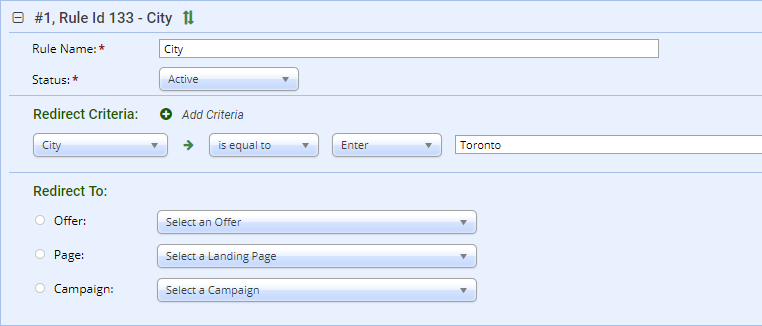
When to use redirect rules:
- Your main offer only accepts certain geos, but you’re getting traffic from elsewhere
- Certain device types convert better on different offers
- You want to A/B test landing pages by traffic segment
Example: Your offer only accepts US traffic, but 10% of your clicks come from Canada. Instead of wasting those clicks, redirect Canadian traffic to an offer that accepts CA.
You’ve already paid for that traffic. Redirect rules help you monetize every click.
Your Next Step
You now understand how click tracking works. The concepts are straightforward - the execution takes practice.
Here’s what to do next:
- Pick a tracker. If you’re starting out, start with a self-hosted option for cost and data ownership.
- Set up one campaign with proper tracking - traffic source macros, offer link with TrackingID, postback configured.
- Run traffic and verify data is flowing correctly before scaling.
- Use AI to analyze your data once you hit 100+ clicks. See the full workflow.
Tracking is the foundation of every profitable paid traffic business. Get it right from the start, and optimization becomes straightforward. Skip it, and you’ll burn money wondering why nothing works.
Related: Campaign Optimization Guide - How to turn tracking data into profitable campaigns.
Questions? Contact me if you’re stuck on something specific. I use reader questions to improve these guides.