
Build Your First AI Project This Weekend
Stop consuming tutorials. Start creating. Get the free step-by-step guide.
2026 Update:
If you buy media from networks, a click tracker is still the source of truth. Platform pixels are not.
Browsers keep making third-party cookies worse. Google walked back a hard Chrome cookie kill and left it as a user choice. That is not permission to “just use the pixel.” Safari, Firefox, ad blockers, and ITP already punched a hole in client-side tracking. Server-to-server postbacks and first-party setups are the default.
If you are a local business on Google Ads and the phone is the conversion, this is the wrong page. Use CallRail and Plausible. The analytics stack explains that split.
This guide is the mechanics: click ID, postback, macros, redirect rules, and why your tracker and the network disagree.
Every network names SubIDs differently. Every tracker names macros differently. Get it wrong and you are spending with a blindfold on.
After this you should be able to wire a campaign, fire a test conversion, and debug the usual failures without posting “is my postback working” in a Slack.
Quick Navigation
| Section | What You’ll Learn |
|---|---|
| Why this still matters | Pixels vs postbacks in 2026 |
| Glossary | Click ID, SubID, postback |
| How a tracker works | Click to conversion |
| Postbacks vs pixels | What to actually use |
| Choosing a tracker | Cloud vs self-host |
| Redirect rules | Do not waste the click |
| Breakage | Network has sales, you do not |
| Checklist | Before you spend |
Why This Still Matters
A tracker is a database. Each click is a row. Device, geo, ISP, placement, creative, timestamp, then (if you set it up) revenue.
Without that row tied to a conversion, “optimization” is vibes. You cut a zone that was making money because the pixel never fired. You scale a zone that was bots because the ad platform said CTR looked healthy.
Client-side pixels live in the browser. Ad blockers and privacy features can eat them. Server-to-server postbacks are the network’s server hitting your tracker’s server with the click ID. No browser in the middle.
TUNE has been saying the quiet part for years: unique ID at click time, match the conversion later, accuracy goes up. That is still the model.
For on-site behavior (scroll, paths, thank-you page), use Plausible or GA4. For phone leads, CallRail. For “which native zone paid me,” you need this.
Click Tracking Terminology
Click ID (Tracking ID): Unique ID the tracker mints on the click. This is the whole game. Everything attaches to it.
SubID: Parameters that carry your Click ID (and anything else) through the network. Names vary: s1, sub1, aff_sub, clickid. Do not guess. Read the network doc or ask the AM.
Postback URL: Server-to-server callback when a conversion happens. Gold standard.
Conversion pixel: Image or JS on a thank-you page. Works until it does not.
Query string: The ?key=value&key2=value2 part of a URL.
User-agent: Browser/OS string. Tracker uses it for device reports.
Tracking link: What you put in the ad. Tracker captures, then redirects.
Offer link: Network URL you send the visitor to after the tracker.
KPI: CTR, CVR, EPC, ROI. Pick a few. Ignore vanity.
How a Click Tracker Works
- Visitor hits your tracking link
- Tracker stores IP, UA, referrer, your parameters, and a new Click ID
- Tracker redirects to the lander or offer, appending the Click ID in the network’s SubID slot
- Later, conversion fires a postback with that Click ID
- Tracker marks the row as converted and stores payout
Data you get for free
Device type, OS, browser, ISP/carrier, IP, country/region/city, referrer, time.
Data you pass on purpose
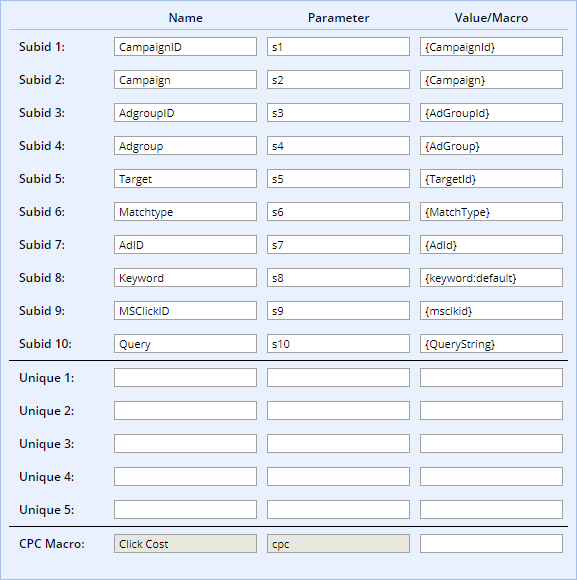
Traffic sources give macros. The ad platform replaces them at click time.
https://tracker.example/click?campaign={CampaignId}&keyword={keyword}&device={device}
becomes real IDs. Microsoft Ads and Google Ads are good at this. Meta is still mostly “make a separate campaign and hardcode the name.” TikTok has campaign tokens. Native networks usually give {campaign_id} and {site_id}.
| Platform | Campaign | Keyword / placement | Device |
|---|---|---|---|
| Google Ads | {campaignid} | {keyword} | {device} |
| Microsoft Ads | {CampaignId} | {keyword} | {device} |
| Meta | Manual | Manual | Manual |
| TikTok | __CAMPAIGN_ID__ | __PLACEMENT__ | Manual |
| Native (typical) | {campaign_id} | {site_id} | {os} |
Confirm tokens in the current platform doc. They change the spelling more often than they change the idea.
Once data flows, campaign optimization is what you do with it.
Postbacks vs Pixels
Image pixel: 1x1 on the thank-you page. Simple. Blockable. Needs the page to load.
JavaScript pixel: More flexible. Still the browser.
S2S postback: Network server -> your tracker. Survives blockers, delayed conversions, cross-device better than a cookie. Harder to set up once. Then it is boring, which is what you want.
Use postbacks. Pixels as a fallback only if the network cannot postback.
Wire a postback
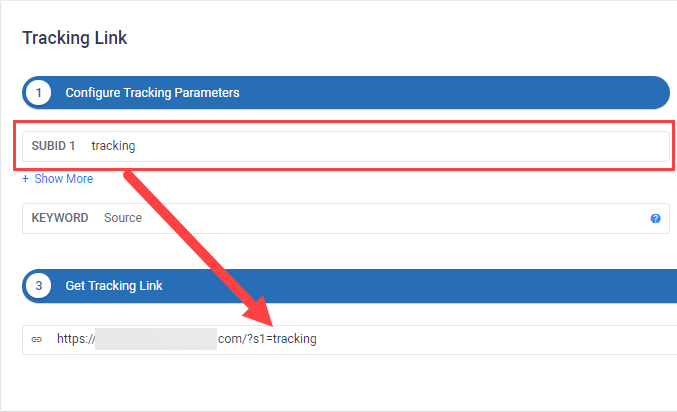
- Find the network’s SubID name (
s1,aff_sub,clickid, …) - In the tracker offer URL, append your Click ID macro (
{clickid}/{click_id}depending on vendor)
https://network.com/offer?s1={clickid}
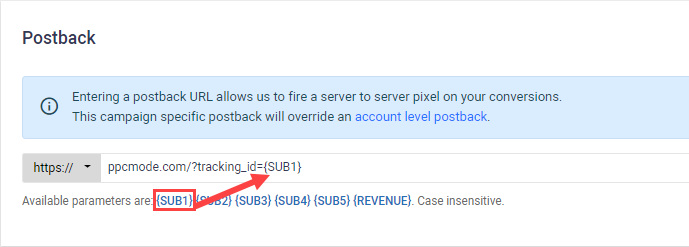
- Put the tracker’s postback URL in the network:
https://yourtracker.com/postback?clickid={s1}&payout={payout}
- Test. One conversion. Click ID matches. Payout matches. Network postback log vs tracker log.
If it fails, it is almost always a macro name mismatch or URL encoding. Use the network’s postback log. webhook.site is useful when you need to see the raw hit.
First-party / server GTM
If you control the advertiser site, you can set first-party cookies from a subdomain (track.yourdomain.com) and fire tags server-side. Stape documents the affiliate version of this. Worth it when you own the domain and you are tired of the pixel disappearing. It is extra infrastructure. Do not start here on day one if you do not own the offer page.
Choosing a Tracker in 2026
Cloud = faster start, you rent the database, you pay for events. Self-host = you own the logs, you patch the box, license is usually flatter.
Prices move. Confirm on the vendor site before you budget.
| Tracker | Hosting | Notes |
|---|---|---|
| Voluum | Cloud | Automations, anti-fraud, MCP. Event caps. Plans are campaign + event bundles. |
| RedTrack | Cloud | CAPI, rules, trial. Good first cloud tracker. |
| BeMob | Cloud | Cheap / free tier to learn the model |
| Keitaro | Self-host | Euro-priced license, no click cap, you bring the VPS |
| Binom | Self-host | Built for speed, flat license, you bring the VPS |
My default: RedTrack (or BeMob) to learn. Self-host when volume makes event billing stupid and you will actually maintain a server.
If you only run Google Ads for a plumber, do not buy these. That is CallRail.
Voluum’s own pricing page is slider-based (campaigns, events, domains, MCP request limits). Third-party 2026 roundups often quote entry cloud trackers around $100-$150/month. I will not pretend a scraped $199 from 2024 is still the SKU.
Using The Data
Slice by the dimensions you bothered to pass: placement, device, city, hour, creative.
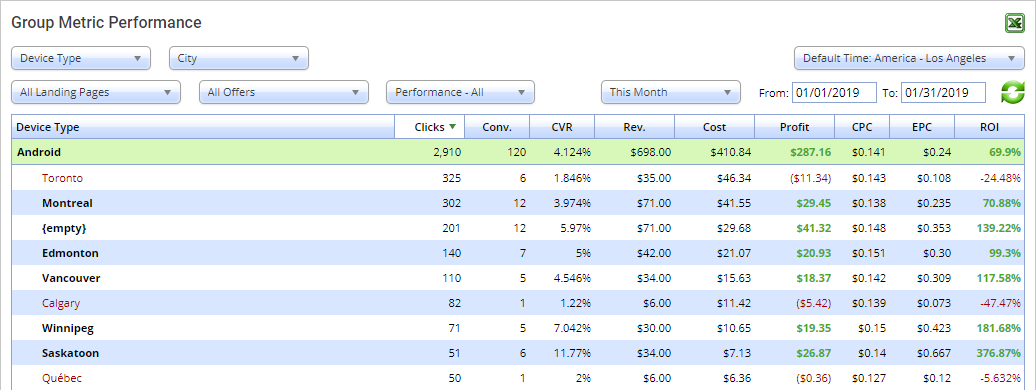
If Android + Toronto is trash:
- Exclude at the source if the platform lets you
- Or redirect that slice to a different offer instead of eating the click
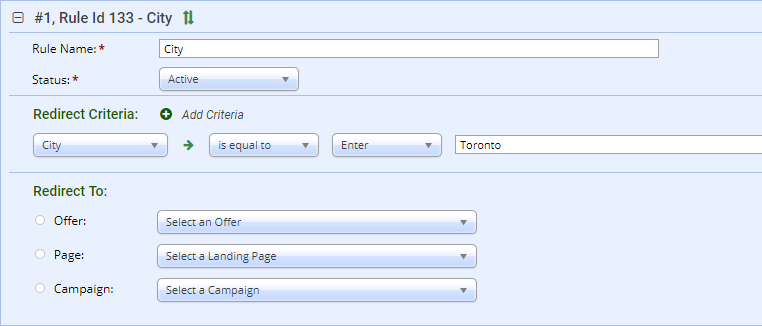
Useful rules: geo mismatch -> global offer. Mobile vs desktop offers. Carrier. Daypart. Safari vs Chrome if the lander is broken on one of them.
That is the edge. Collecting data and then pausing the whole campaign is not.
For scaling winners: scaling campaigns.
Using AI On Tracker Exports
Export CSV. Ask specific questions with thresholds. “Analyze this” is how you get a book report.
Affiliate tracking export from [source].

1. TOP (min 100 clicks): top 10 placements by ROI. Table: placement, clicks, conv, spend, revenue, ROI, CVR.
2. CUT (min 50 clicks, negative ROI): block list + estimated savings.
3. SCALE (positive ROI, under 200 clicks): what to raise.

Tables only, then three actions.
Same idea for hour-of-day and device+geo. Flag any slice under ~50 clicks as “not enough data.” AI will happily overfit noise if you let it.
More prompts: AI tools for media buying.
Common Tracking Problems
Network has conversions, tracker does not
Click ID not passing (encoding). Wrong postback macro. Postback hitting the wrong endpoint. Tracker rejecting the payload.
Fix: network postback log -> compare Click ID to the tracker click -> fire a manual test postback.
Tracker has more conversions than the network
Pixel + postback both live (double count). Thank-you refresh. Missing dedupe on transaction ID.
Fix: one method. Prefer postback. Turn on Click ID / txn dedupe.
Empty columns
Wrong macros. URL too long. Custom params never defined in the tracker. Facebook not magically filling tokens.
Geo/device looks fake
VPNs, carrier proxies, spoofed UA, stale geo DB. Cross-check against the traffic source. Use the tracker’s fraud tools if you have them. Some of this is just the channel.
Postback never fires
Not saved in the network. Required param missing. Still in test mode. Domain not allowlisted. Ask the AM.
The Tracking Checklist
Before spend:
- Tracking link with the macros you care about
- Click ID in the offer URL under the correct SubID
- Postback in the network, correct macros
- Test click shows a row with data
- Test conversion shows in both systems
- Payout passes
- Redirect rules for known junk geos/devices if you already know them
First 24 hours:
- Discrepancy tracker vs network (more than a few percent, stop and fix)
- Unexpected geos/devices
- Macros actually populating
Weekly:
- Export, run the winners/losers prompt
- Update blocks and redirect rules
What To Do Next
No tracker yet? Take a cloud trial (RedTrack is the usual starting point) and complete the test click + test postback before real budget.
Already tracking? Export 30 days. Run the cut/scale prompt. You will find at least one placement to kill.
Local service and the phone is the conversion? Leave this page. CallRail + Plausible. Full stack: marketing analytics.
The buyers who last are not the ones with the biggest spreadsheet. They are the ones whose Click ID still matches on Friday.
Related: